W&B image uploads.
During Phase 1 (detector) and Phase 2 (keypoints), the Ultralytics → W&B integration ships a fixed set of images to wandb.ai — your training mosaics, validation predictions, label distribution, and curve plots. This doc lists exactly what uploads, when, and how to control it. Phase 3 (PPO) uploads no images.
_wandb_begin() in train_apex.py:238aigp-gate-detector · aigp-gate-pose · aigp-obstacle-detectorset AIGP_WANDB=0wandb.ai as part of training-batch mosaics, plus validation predictions on validation images. If your dataset contains anything you wouldn't put on a public webpage, configure your W&B project as private (default) or disable W&B for that run.
§ 00Real samples from your last run
Pulled from wandb/run-20260424_225626-izsiodv7/ — what actually shipped to wandb.ai during your most recent gate-detector training. Same files, byte-for-byte.
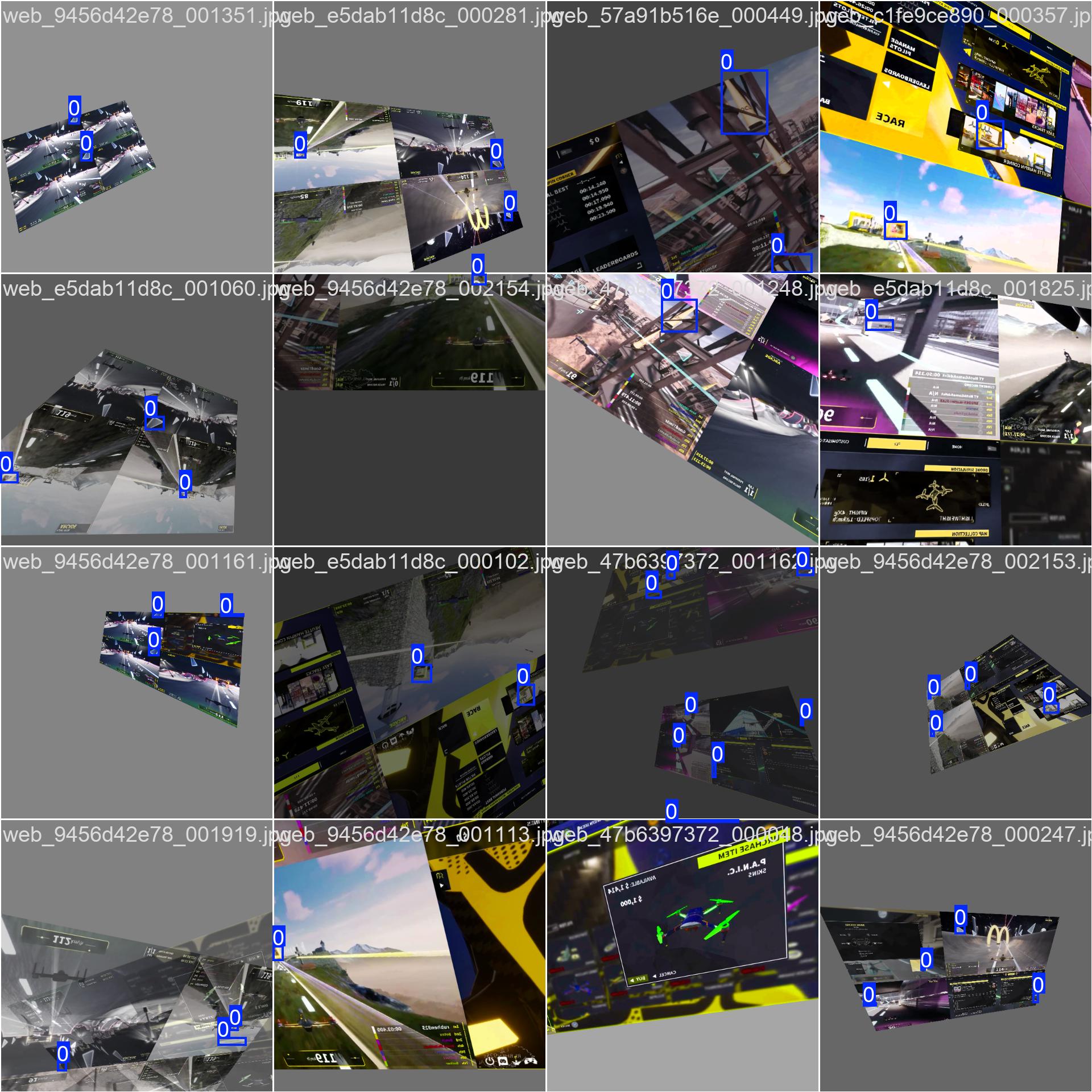
Training mosaic — train_batch0.jpg
16 augmented training images stitched into a 4×4 grid, with ground-truth boxes drawn. This is the exact view of your dataset post-augmentation that the model saw on the first batch.
Validation: ground truth vs. predictions
Every validation epoch, the same val images are uploaded twice — once with GT boxes (left) and once with the model's predictions at that epoch (right). Scrubbing the W&B media slider shows predictions sharpening as training progresses.
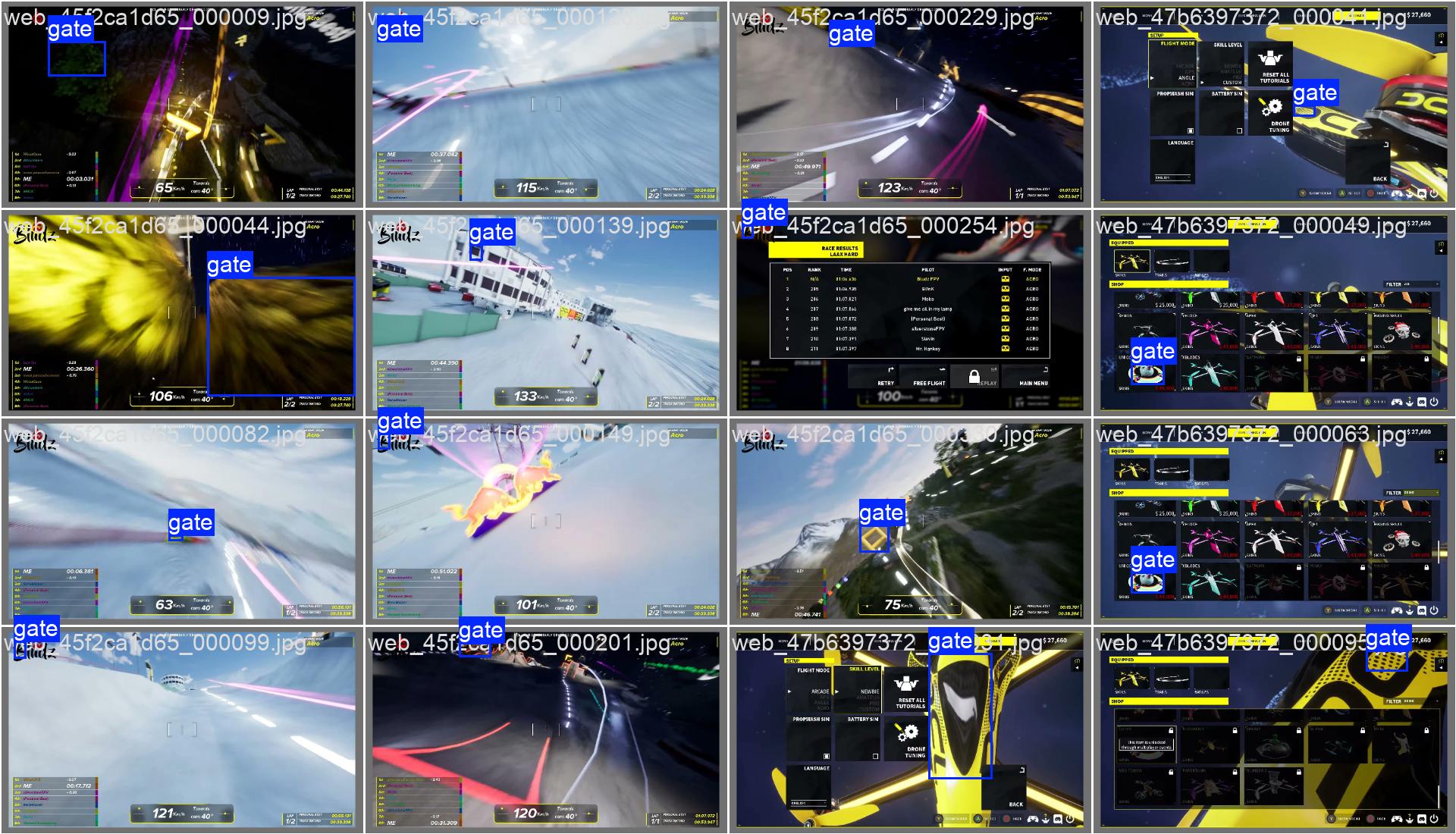
val_batch0_labels.jpg — ground truth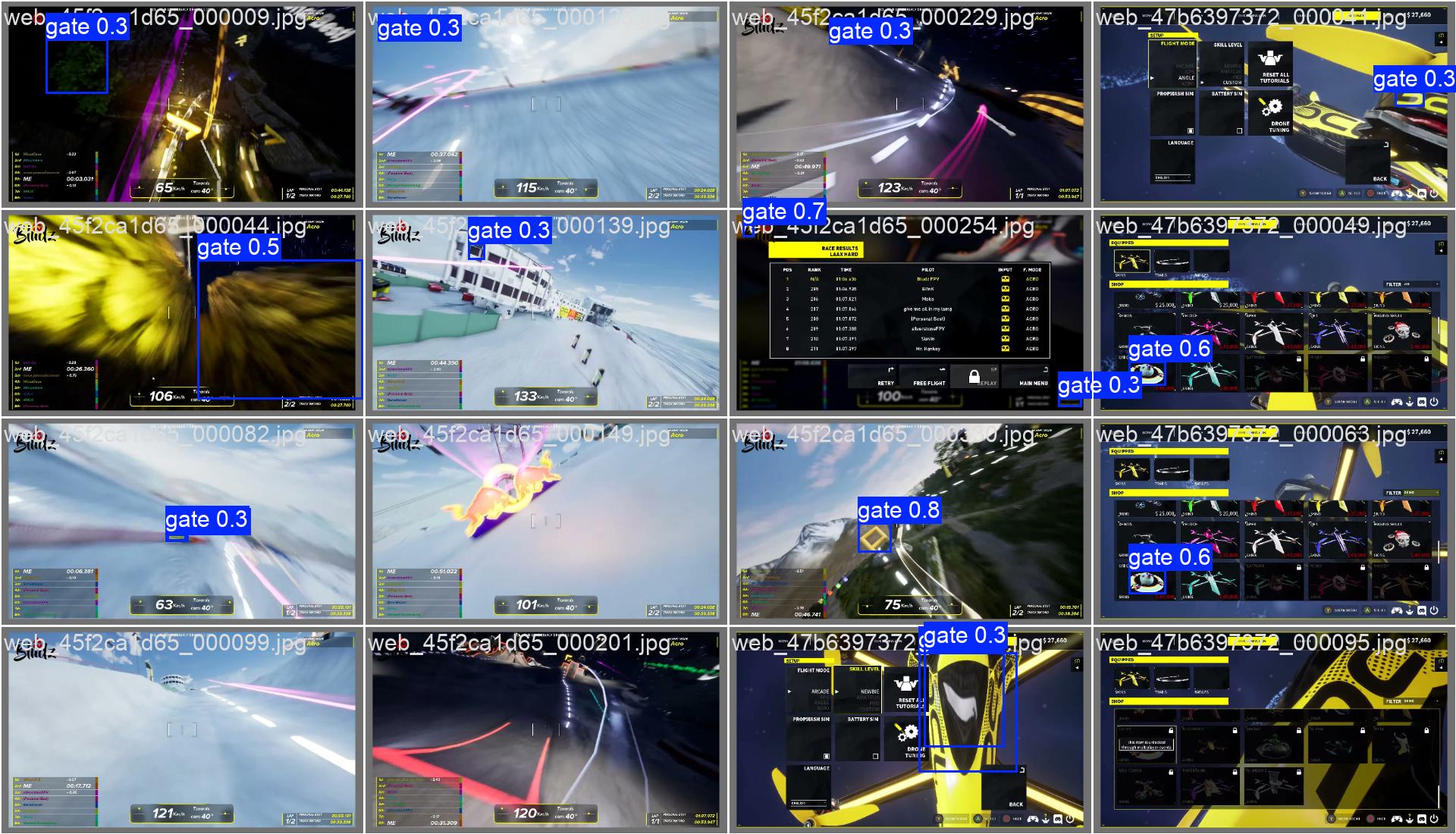
val_batch0_pred.jpg — model output at epoch 31Dataset statistics — labels.jpg
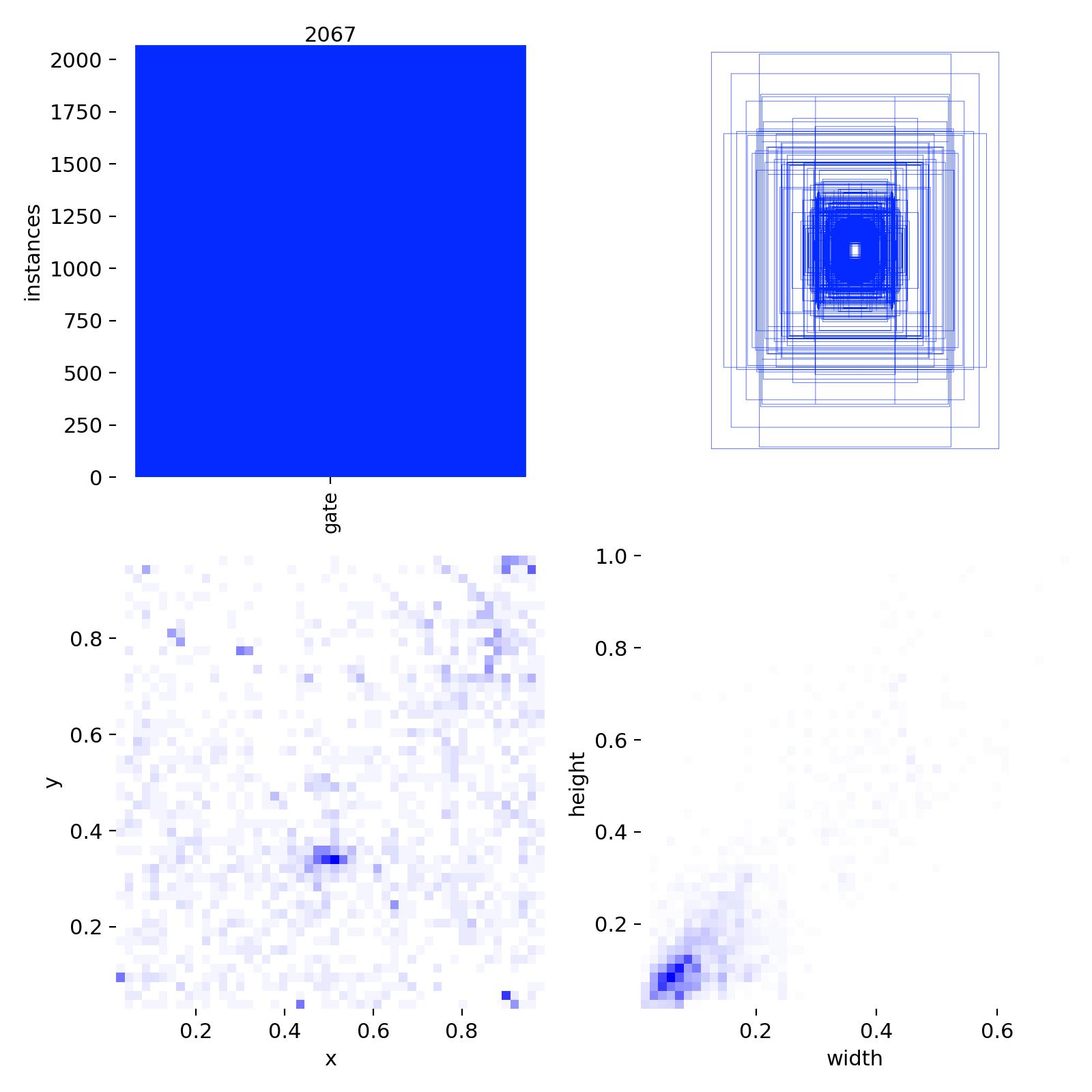
Histograms of class balance, box-size distribution, and x/y centroid heatmap. Gives you a one-glance read on whether your dataset has sneaky biases (all gates clustered top-center, etc.).
Curves and confusion — training trajectory
Uploaded once at training end. The PR curve and confusion matrix tell you "is the model good?"; results.png tells you "did it converge cleanly?"
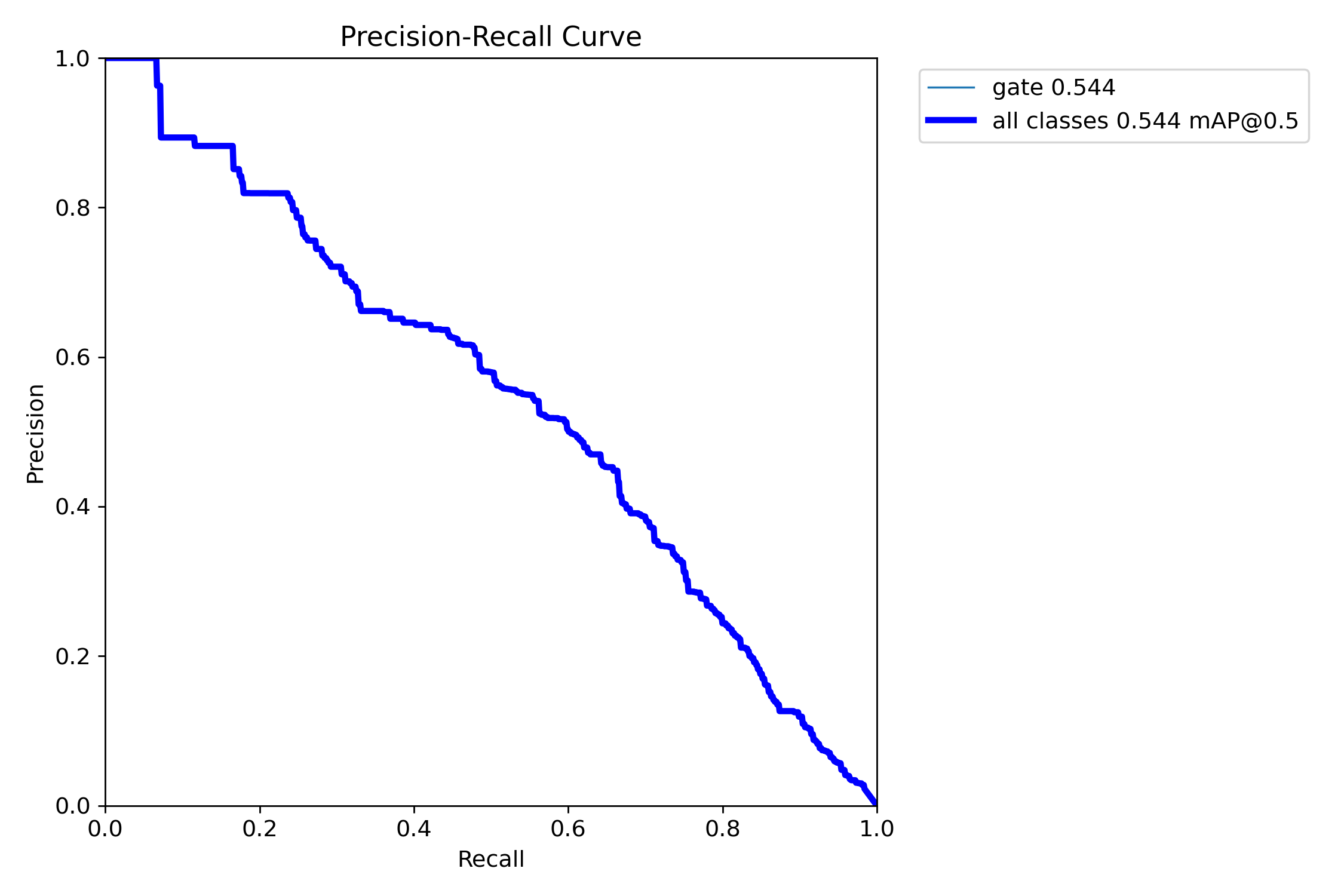
PR_curve.png — final precision-recall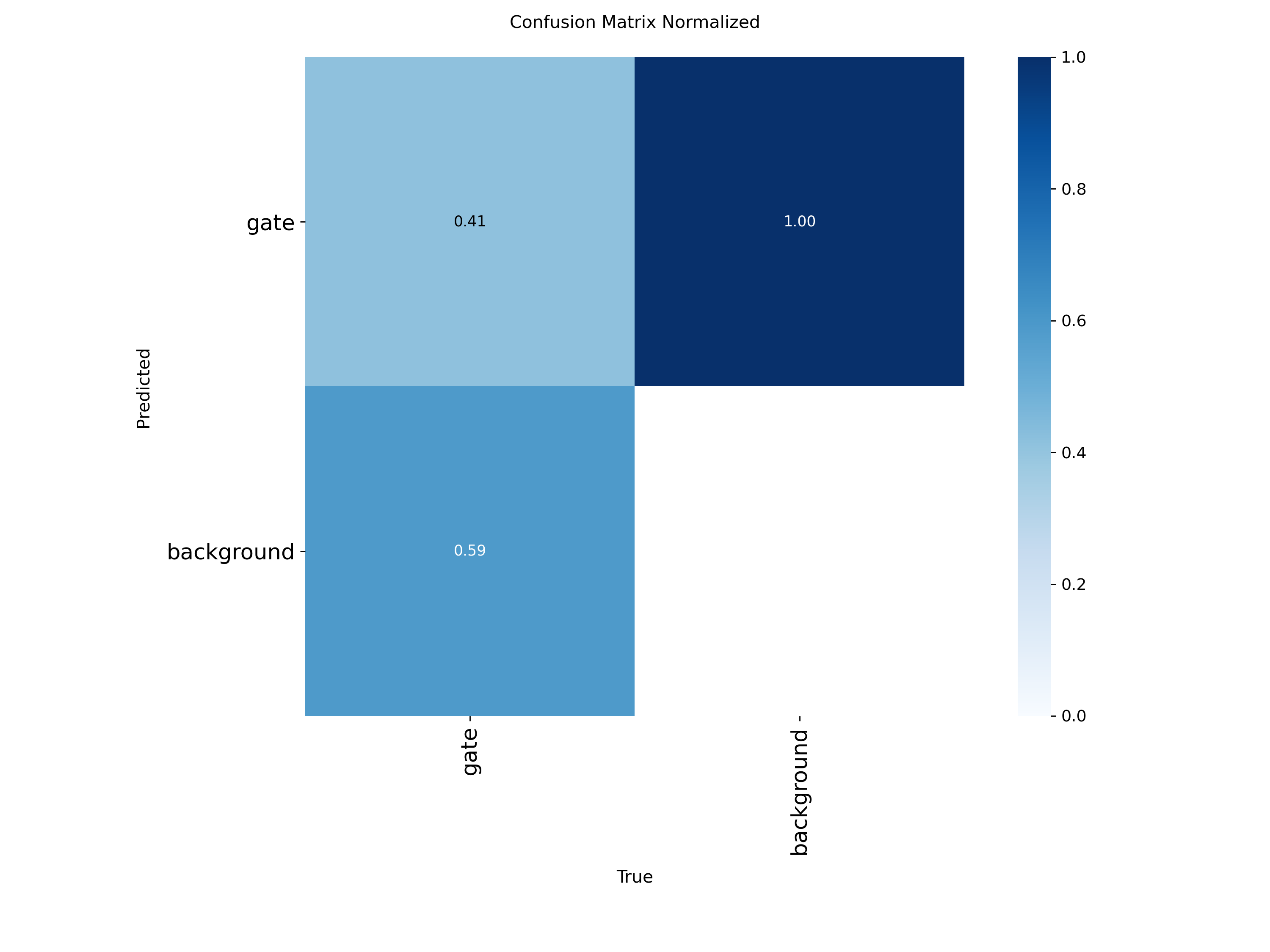
confusion_matrix_normalized.png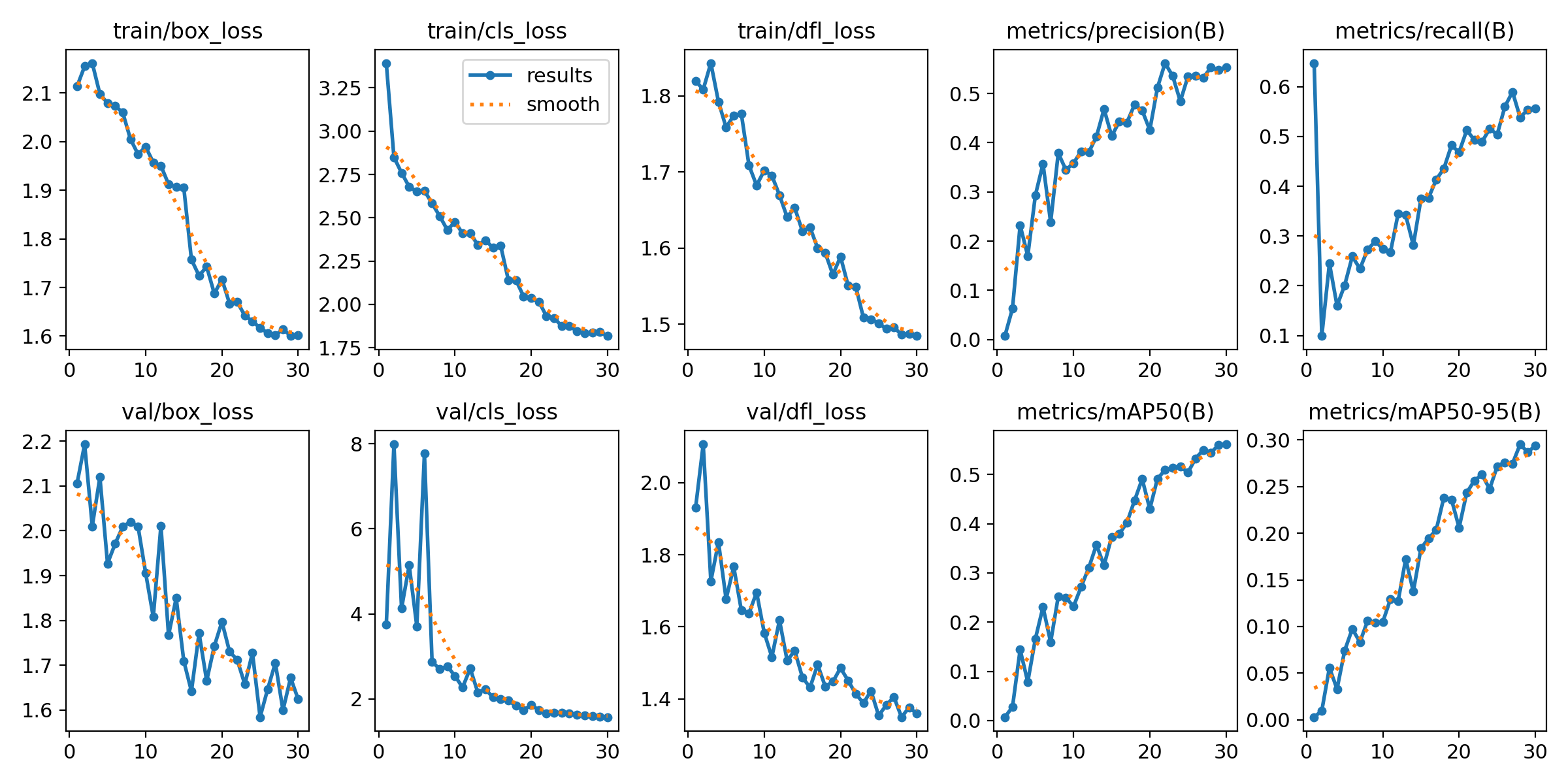
results.png — losses, mAP50, mAP50-95 over all epochswandb/run-<timestamp>-<id>/files/media/images/. That folder is the local mirror of what's on the W&B server — open any file there and you're looking at exactly what got uploaded.
§ 01The exact files
Ultralytics writes these files to runs/detect/<name>/ (or runs/pose/<name>/ for keypoints), and the W&B callback uploads each one as a media artifact attached to your run. Open any of them inside the W&B UI under Files or in the Media panel.
Training batch mosaics — your training data
| File | Contents | Uploaded |
|---|---|---|
train_batch0.jpg | 4×4 mosaic of 16 augmented training images, with GT boxes drawn | once, at start |
train_batch1.jpg | same, second batch | once, at start |
train_batch2.jpg | same, third batch | once, at start |
These are the most "your-data-shaped" uploads. Each mosaic embeds 16 training images at native resolution, post-augmentation (mosaic, flip, HSV, mixup if enabled). If you trained on dataset_gates_dcl_web/, the frames you scraped end up here.
Validation batch images — your val set + predictions
| File | Contents | Uploaded |
|---|---|---|
val_batch0_labels.jpg | 4×4 mosaic of validation images with ground-truth boxes | every val epoch |
val_batch0_pred.jpg | same images with predicted boxes (model output) | every val epoch |
val_batch1_labels.jpg | second val mosaic | every val epoch |
val_batch1_pred.jpg | predictions for second mosaic | every val epoch |
val_batch2_labels.jpg | third | every val epoch |
val_batch2_pred.jpg | third predictions | every val epoch |
These get re-uploaded each validation epoch (every epoch by default) so you can scrub the slider in the W&B media viewer and watch predictions sharpen over training. Ultralytics overwrites the same filename — W&B versions them server-side.
Dataset summary plots — label statistics
| File | Contents |
|---|---|
labels.jpg | histogram of class counts, box-size distribution, x/y centers |
labels_correlogram.jpg | pairwise correlation of x, y, w, h across all labels |
These describe your dataset shape, not individual images. Useful for spotting label imbalance (e.g. all gates clustered in image center → policy will overfit to that prior).
Metric curves — training trajectory
| File | Contents |
|---|---|
PR_curve.png | precision-recall curve at training end |
F1_curve.png | F1 vs confidence threshold |
P_curve.png | precision vs confidence threshold |
R_curve.png | recall vs confidence threshold |
confusion_matrix.png | raw confusion counts |
confusion_matrix_normalized.png | row-normalized version |
results.png | full training curves: box/cls/dfl loss, mAP50, mAP50-95 |
RichTrainingCallback in apex_progress_ui.py renders to your terminal only — no images, no W&B, nothing leaves the box.
§ 02When uploads happen
The Ultralytics callback fires on these events:
| Event | What uploads |
|---|---|
| train start (epoch 0) | train_batch{0,1,2}.jpg, labels.jpg, labels_correlogram.jpg |
| each val epoch | val_batch{0,1,2}_{labels,pred}.jpg (overwrites previous) |
| train end | all curve PNGs (PR, F1, P, R), confusion matrices, results.png |
| scalar metrics | logged every epoch — mAP50, mAP50-95, losses, lr (these are numbers, not images) |
For our typical config (200 epochs, validation every epoch), one detector run uploads:
- 3 training mosaics (one-time, ~ 200 KB each)
- 2 dataset plots (one-time)
- 6 validation mosaics × 200 epochs = 1200 validation image uploads
- 7 final curve plots
Roughly 200–400 MB of media per run end-to-end.
§ 03How the upload happens (code path)
Our code does not call wandb.log() directly. Instead, we pre-init a W&B run before model.train() so Ultralytics' built-in callback picks up the active run and routes everything through it.
# train_apex.py:238 — pre-init pattern
def _wandb_begin(project: str, run_name: str):
    if _env_str("AIGP_WANDB", "1") != "1":
        return None
    try:
        import wandb
        return wandb.init(project=project, name=run_name, reinit=True)
    except Exception as e:
        print(f"  [W&B] init skipped ({e})")
        return None
Inside YOLO.train(), Ultralytics' callbacks/wb.py hooks fire. Each callback grabs the file path written by plot_images(), wraps it in wandb.Image(), and logs it via wandb.log({"train_batch": wandb.Image(path)}, step=epoch).
The pre-init dance exists because of an old bug: Ultralytics 8.4.32 on Windows crashed when its W&B callback tried to parse paths containing the : in drive letters (C:\Users\...). Pre-initing means the callback finds an existing run instead of creating one with the buggy path-parsing code path.
site-packages/ultralytics/utils/callbacks/wb.py. Functions on_pretrain_routine_start, on_fit_epoch_end, on_train_end.
§ 04Where they live on wandb.ai
For a run named apex_yolo11n in project aigp-gate-detector, the URL is:
https://wandb.ai/<your-username>/aigp-gate-detector/runs/<auto-id>| Tab | What you see |
|---|---|
| Overview | config, command, system info, summary metrics |
| Charts | scalar metrics over time (mAP, losses) |
| Media | all uploaded images, with epoch slider |
| Files | raw artifact list — every uploaded file by name |
| Logs | captured stdout from the training process |
| System | GPU mem, util, temps, CPU, network — also auto-uploaded |
§ 05Privacy & access
- Default visibility: W&B projects are private by default — only your account sees them. Verify on the project's Settings → Privacy page.
- Team accounts: if your account is part of a W&B team, all team members see all team runs.
- Public sharing: changing a project to public exposes all images uploaded across all historic runs. There is no per-run public toggle.
- Deletion: deleting a run removes its media. The W&B server retains backups for ~30 days.
- Logs. stdout often contains your dataset paths, file names, and shell environment. Treat the Logs tab as semi-public if your project is public.
dataset_gates_dcl_web/ were harvested from public DCL videos; they're not original content. Uploading them to a private W&B project for training-monitoring purposes is fair-use territory. Making the project public would re-publish those frames — keep it private unless you've checked rights.
§ 06How to control or disable
Disable W&B entirely for one run
set AIGP_WANDB=0
python train_apex.py detector --dataset dataset_gates_mega --epochs 200
Reads AIGP_WANDB at train_apex.py:239. 0 skips wandb.init(); nothing leaves the box.
Disable just media (keep scalar metrics)
Set WANDB_LOG_MODEL=false and edit your run's settings. Or set Ultralytics' plots=False training arg — this prevents the JPGs from being written, so the callback has nothing to upload.
# Edit train_apex.py call site:
results = m.train(..., plots=False, ...)
Run W&B in offline mode (upload later or never)
set WANDB_MODE=offline
python train_apex.py detector ...
Run is recorded to ./wandb/offline-run-<ts>/. To upload later: wandb sync wandb/offline-run-*. To never upload: just leave it on disk.
Switch project (for sensitive datasets)
python train_apex.py detector \
  --dataset my_private_dataset \
  --wandb-project aigp-private-research
Use a separate, locked-down project for runs you want isolated from your main dashboard.
Audit what already uploaded
The wandb/ directory in this repo (gitignored, but on disk) contains every run's local copy. Check wandb/run-<ts>/files/media/images/ to see exactly what shipped. Same content as the W&B server, byte-for-byte.
§ 07FAQ
Are full training images uploaded, or only thumbnails?
Mosaics are at imgsz (default 640 px) per cell — so a 4×4 mosaic is 2560×2560 px. That's the same fidelity as your training pipeline saw. They're saved at JPEG quality 95 by Ultralytics' plot_images(). Not thumbnails.
Are model weights uploaded?
By default, no. Set WANDB_LOG_MODEL=true if you want them uploaded as W&B artifacts. We don't, because models live in models/latest/ with our own backup/promote rotation.
Does the policy phase upload anything?
No. Phase 3 (PPO) doesn't use W&B at all in our wiring. Metrics there go to TensorBoard (output/apex_policy/tb_apex/) and the new live Rich dashboard. Stay-local-only.
What about RF-DETR runs?
RF-DETR uses its own roboflow.deploy() path and is not currently wired to W&B in train_apex.py. If you add it, it would log via the same Ultralytics-style callback pattern.
What if I want every val image, not just three mosaics?
Edit Ultralytics' default val_batches=3. There's no clean kwarg — patch the source or set cfg.val.plots hooks. Most teams find 3 mosaics × 16 images = 48 val images per epoch is plenty for visual eyeballing.
Cross-refs: training runbook · model eval dashboard · related code: train_apex.py:236-260, train_apex.py:413, train_apex.py:620.